Shared Canvas, separate campuses
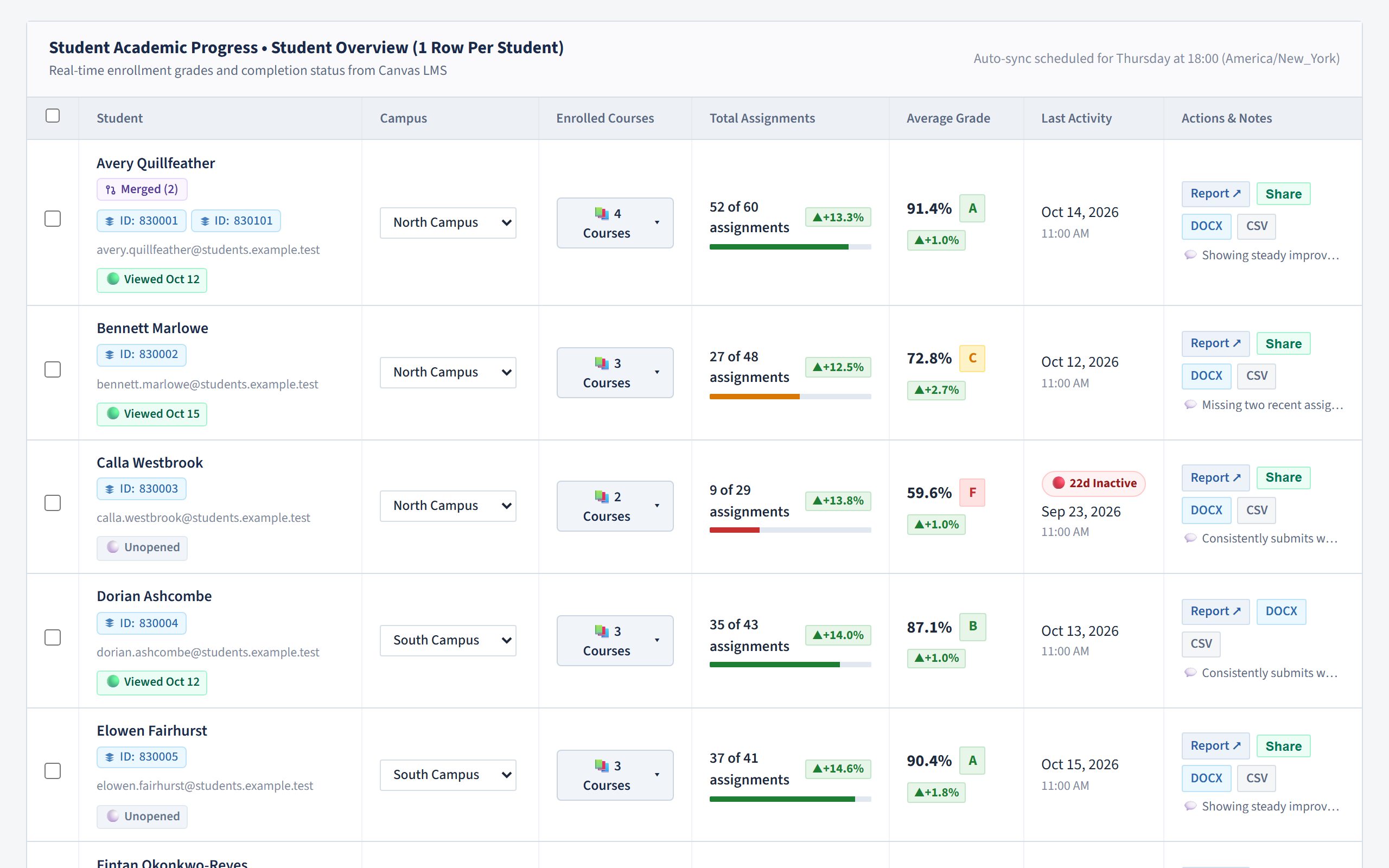
When several campuses share one Canvas instance, Canvas alone cannot keep them apart. Dyyno assigns every student to a campus and keeps each campus's caseload separate.
Built on Canvas LMS
Dyyno turns your Canvas data into counselor caseloads, official progress reports and read-only parent links, with a phone-friendly portal for teachers. It works even when several campuses share a single Canvas instance.
When several campuses share one Canvas instance, Canvas alone cannot keep them apart. Dyyno assigns every student to a campus and keeps each campus's caseload separate.
Students who hold several Canvas accounts are merged into one row, with every course they take in one place: on the roster, the report card and in exports.
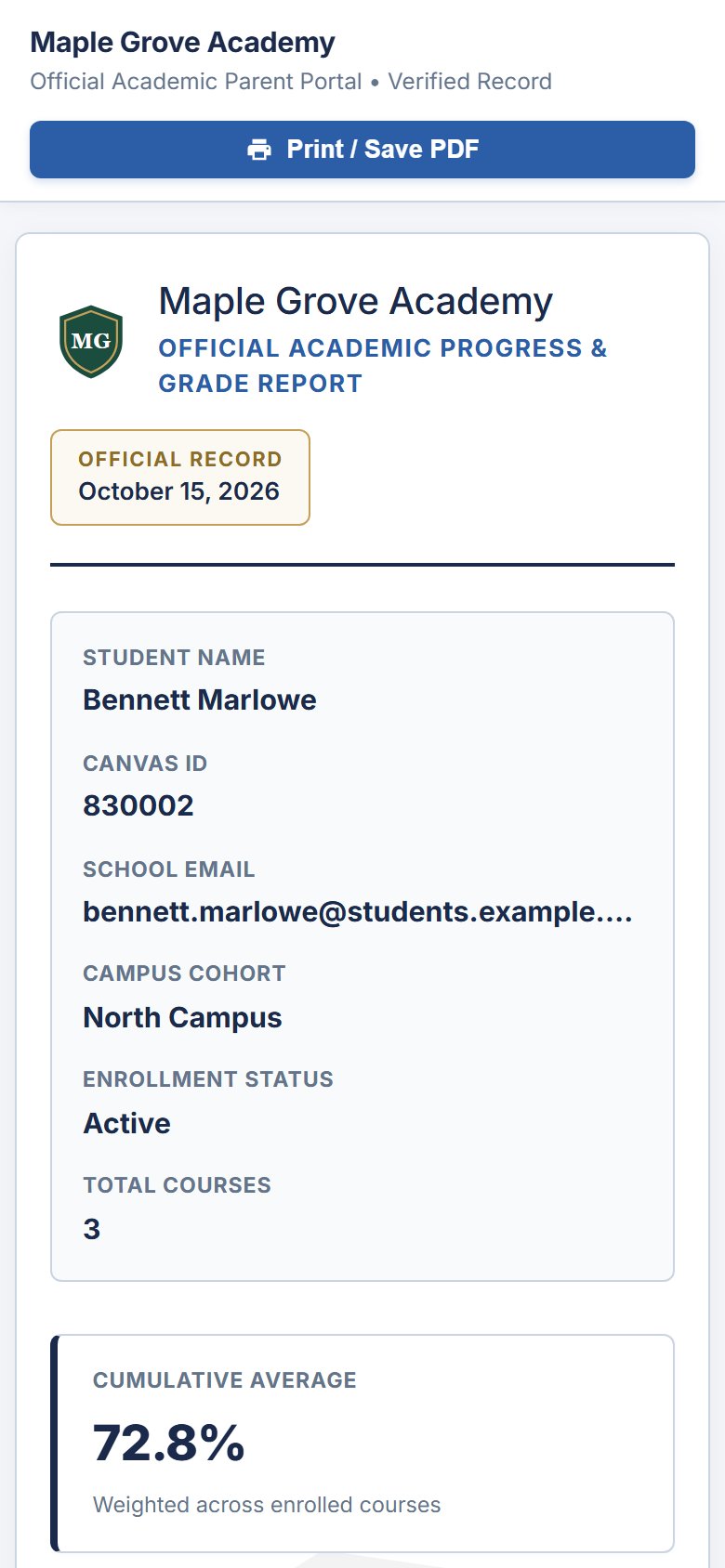
Parents open a private, read-only link to their child's report. No passwords to forget, and staff can see when a report has been viewed.
Features
Grades, assignment completion, last activity and week-over-week trends for every student, with live search and filters for students who are at risk or inactive.
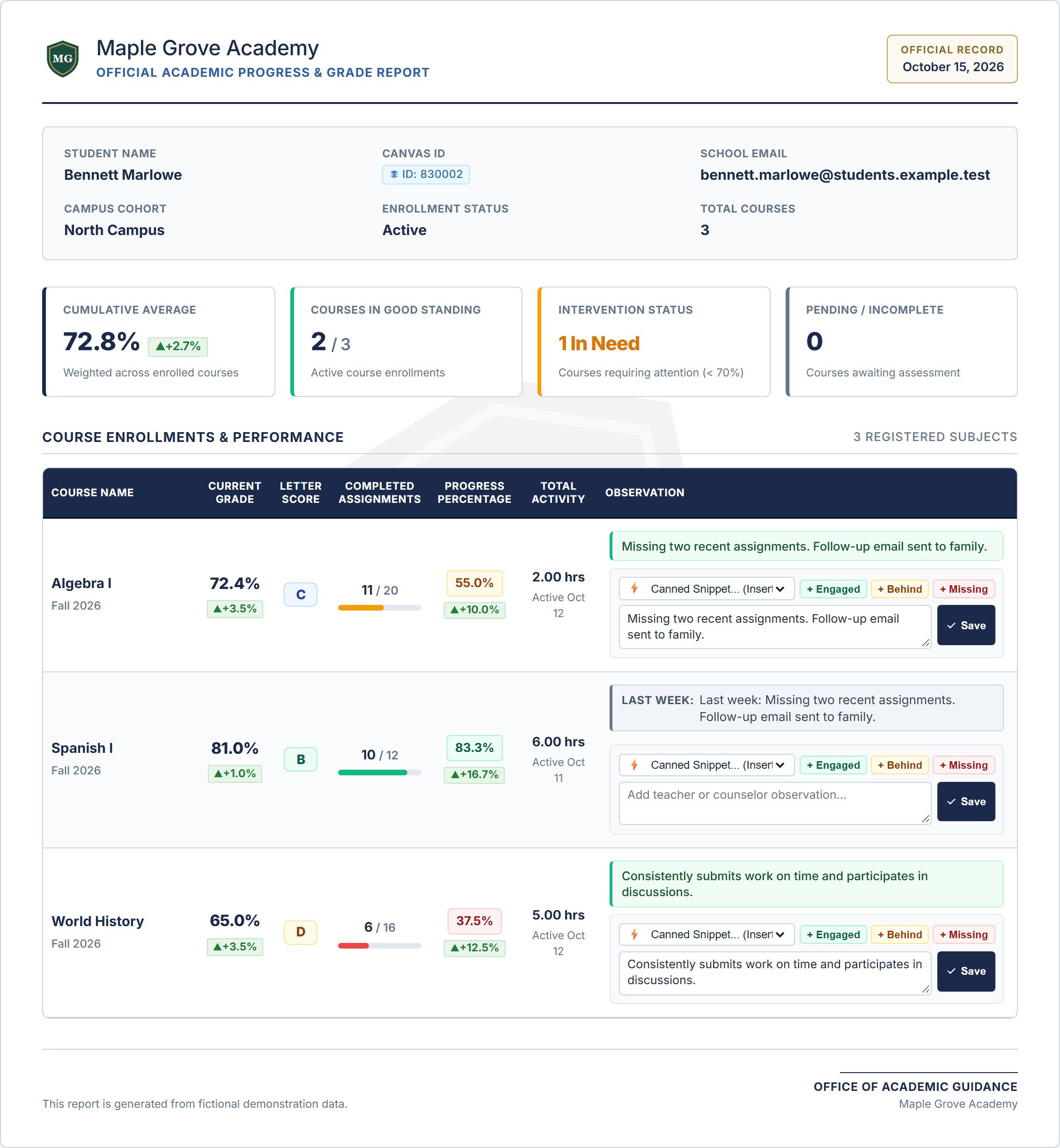
A print-ready US Letter report card with your school's logo, saved as PDF from the browser or exported to Word, one student at a time or a whole campus at once.
Share a read-only report with one click. Links can be regenerated at any time, and your school can set them to expire.
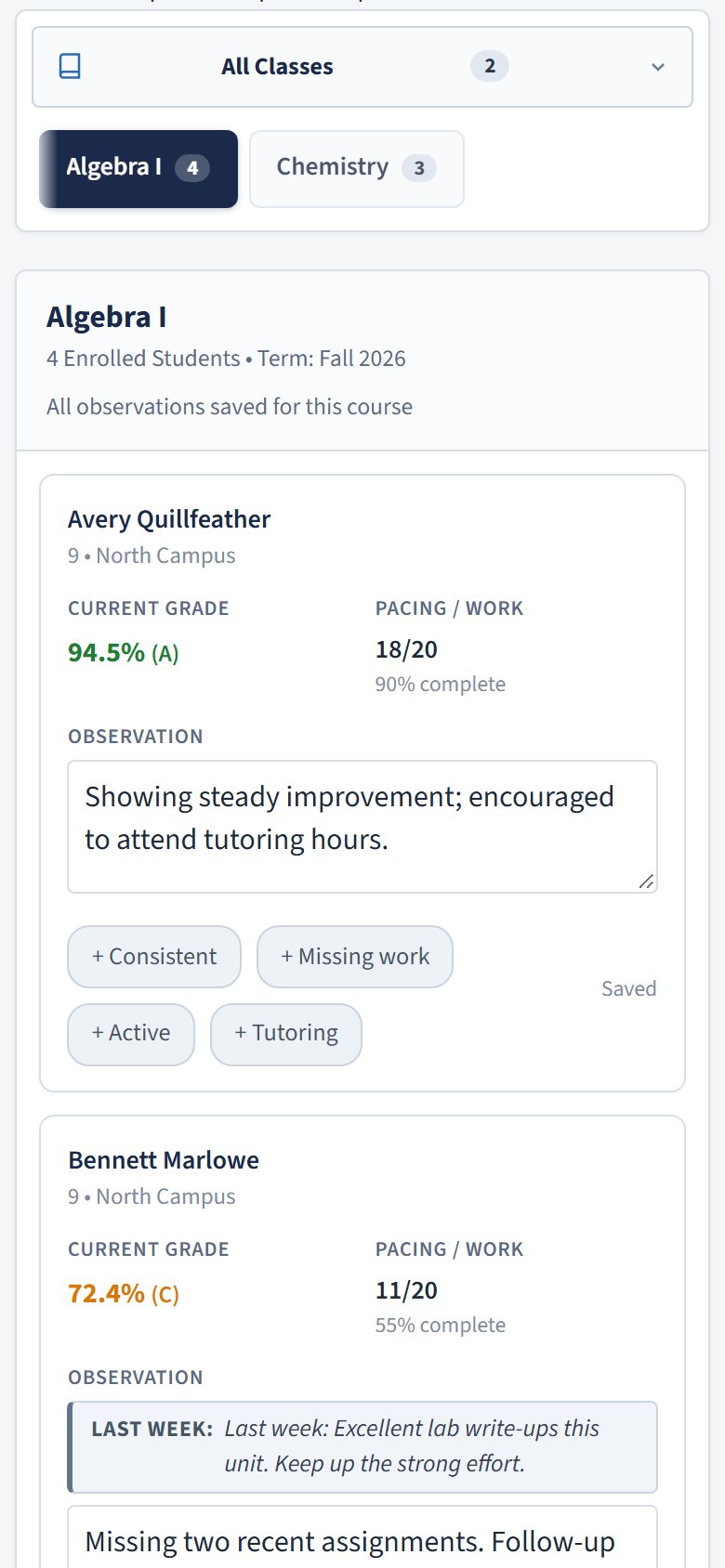
Each teacher gets one secure link to all of their classes. Observations save automatically as they type, and the portal works well on a phone.
See which classes still miss teacher observations this cycle, with each teacher's portal link ready to send.
Canvas data syncs on the schedule you choose. Each week is kept, so you can open any past week's report exactly as it was.
Report card
Every course, grade, completion rate and observation on one official page, ready to print or save as PDF, with week-over-week changes at a glance.
For teachers
Teachers open their personal link and write notes for each student while they think of them. Quick phrases help, and everything saves on its own.
For administrators
Completion per class and per teacher, with the classes that need attention first.
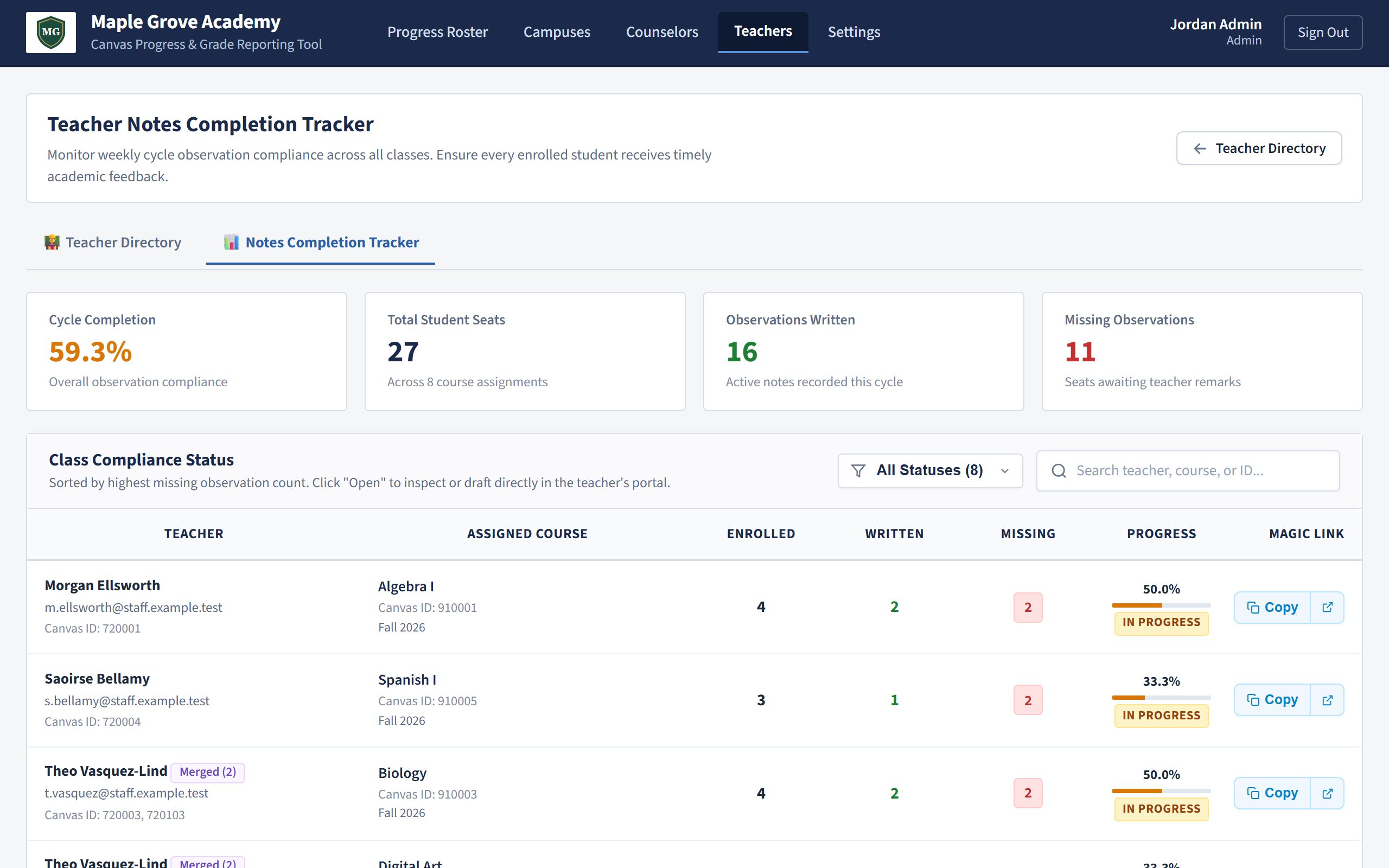
Screenshots show a fictional school with invented students.
How it works
Add your Canvas address and an API token. Dyyno reads courses, enrollments and grades, and never changes anything in Canvas.
Create your campuses, assign students, and give each counselor access to the campuses they serve.
Send teachers their portal links, print or share reports with families, and let the weekly sync keep everything current.
Sign in with Google
School staff (administrators and counselors) can sign in to Dyyno with their Google account instead of a password. Teachers and parents never need to sign in.
Only your email address and your Google account ID (the basic "openid" and "email" permissions). Dyyno never gets access to your Gmail, Google Drive, contacts, calendar or any other Google data.
Only to confirm who you are and sign you in to your school's Dyyno workspace, and to match your Google account to the staff account your school created for you.
It never sells your Google data, never uses it for advertising, never shares it with other companies for their own use, and never uses it to train AI models.
You can unlink your Google account at any time, and your school can remove it. All details are in our Privacy Policy.
Security & privacy
Every school has its own address and its own data. Automated tests check every page of the app to make sure one school can never see or change another school's records.
Counselors only see the campuses they are assigned to; a counselor without campuses sees no students at all.
Canvas API tokens are stored encrypted. Parent and teacher links are long random codes that the school can replace at any time.
All traffic is encrypted with HTTPS, sign-in and public links are protected against repeated guessing, and the database is backed up every day. Hosted in the EU (Germany).
FAQ
If you choose "Sign in with Google", Dyyno receives only your email address and Google account ID, and uses them only to sign you in. It never accesses your Gmail, Drive or other Google data and never sells or shares it. See our Privacy Policy.
Your school stays in control: Dyyno works as a "school official" for your school, uses student information only to run the service for you, never sells it or uses it for advertising, and deletes it when you ask. If your school or state needs a signed data privacy agreement, we will work through it with you. Details are on our Security & Student Privacy page.
No. Dyyno only reads courses, enrollments, grades and activity from Canvas. Observations and campus assignments live in Dyyno.
No. Parents receive a private read-only link to their child's report, and each teacher receives one link to all of their classes. Staff (administrators and counselors) sign in with an account.
Yes, that is the situation Dyyno was built for. You assign students to campuses in Dyyno, and counselors only see their own campuses.
Dyyno merges them into one student, so the roster, report card and exports show every course together.
Yes. The teacher portal and parent reports are designed for phones, and the staff pages adapt to small screens too.
Pricing depends on the size of your school. Request a demo and we will walk you through it.
Each school has its own address. Enter your school's name as it appears in your Dyyno address.
A quick tour of the progress roster, campuses, official reports and the teacher and parent views. Every name and grade in the video is fictional.
Tell us who you are and we will email you a personal link to the Dyyno demo school, usually within one working day. You can explore it as an administrator, a counselor, a teacher or a parent.
We'll set up a walkthrough for your counseling team.
Request a demo